The Rise of AI Agents: How They Work & Step-by-Step Guide to Building One
If you happen to look at Large Language Model. You ask a question to it, for example “how much earth weighs?”, LLMs like chatgpt-3 or 4, Claude (from Anthropic), Mistral will respond back with below response
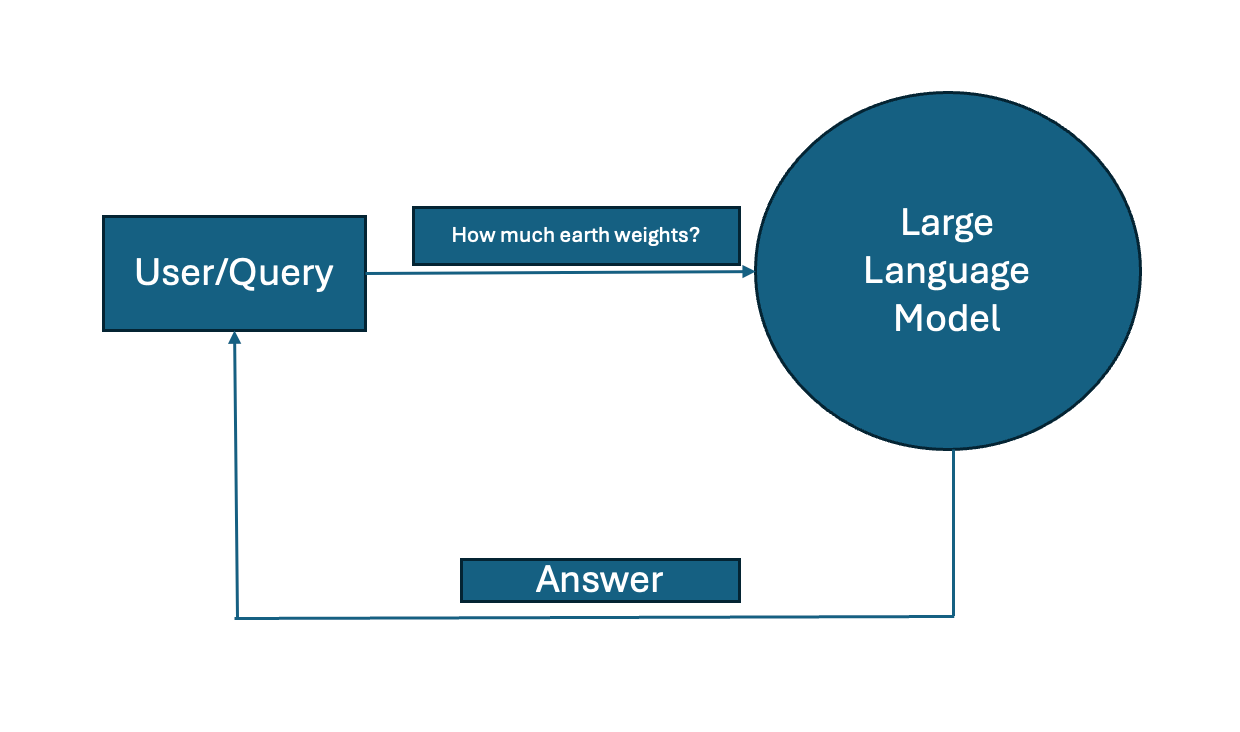
The Earth weighs approximately 5.972 × 1⁰²⁴ kilograms (or about 5.972 septillion kg).
In terms of tons:
– 5.972 × 1⁰²¹ metric tons
What if you were to ask something like “What is my dog’s breed?” or How old is my dog May? In this case, large language model is little bit confused here. It doesn’t have context to answer these questions. It doesn’t know who May is — whether it is a month or name and LLM cannot predict what breed is my dog unless I provide more hints/context for it to guess. So, LLM ends up saying “I don’t know” giving wrong answer or worse it may hallucinate.
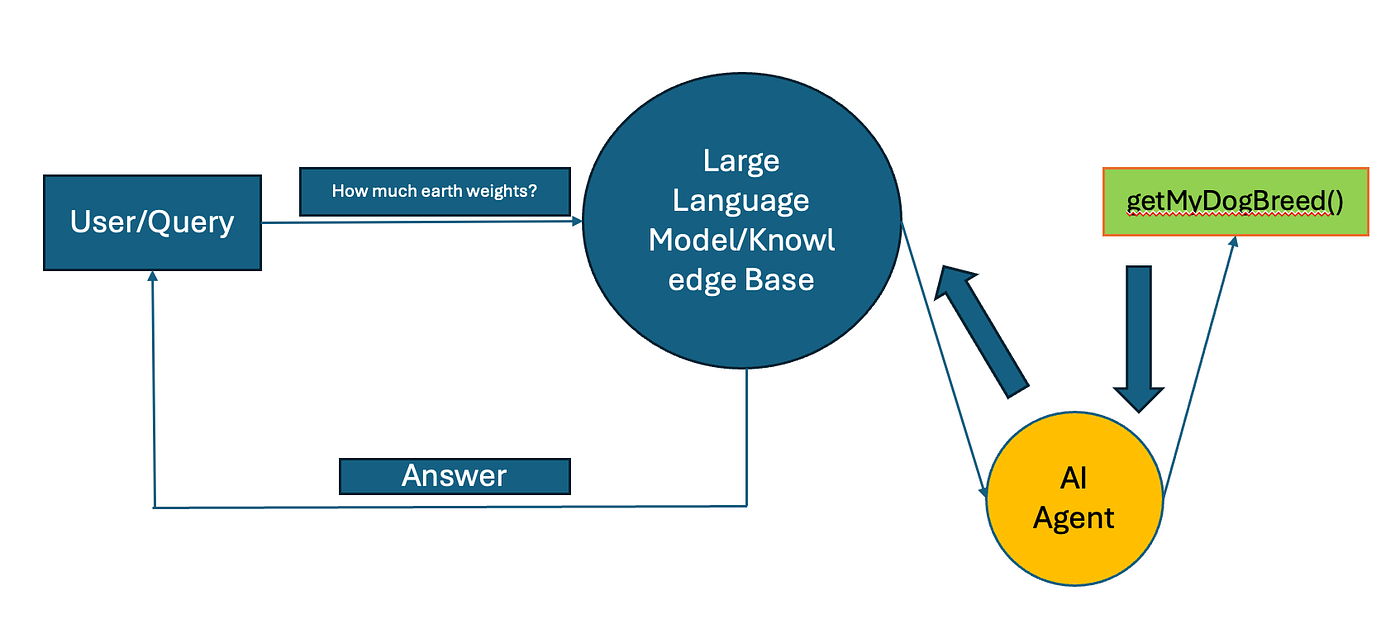
That’s where AI Agents come in picture, Whenever LLM not sure of the answer, it can reach to AI Agent and this Agent will have the capability of accessing internal tools or calling some functions to search about my dog breed (like python..) and get the right answer to pass it to LLM.
So in nutshell what is a(n) AI Agent? AI Agent is a software entity that uses Artificial Intelligence (work with LLMs) to autonomously perform tasks or make decisions on behalf of a user, the Agent is designed to interact with their environment, processes and internal tools to get the results or make an action.
Some of the examples, Based on user query, agent can perform search the web, Query a SQL Database, interact with local CSV files or access internal tool (like CRM, Saleforce…).
Here is real world use-case for AI Agent for Touring & Travels company, As soon as user interacts, AIAgent can autonomously query the user’s previous vacation trips, personalised recommendations based on user’s activities, travel period, duration of travel.
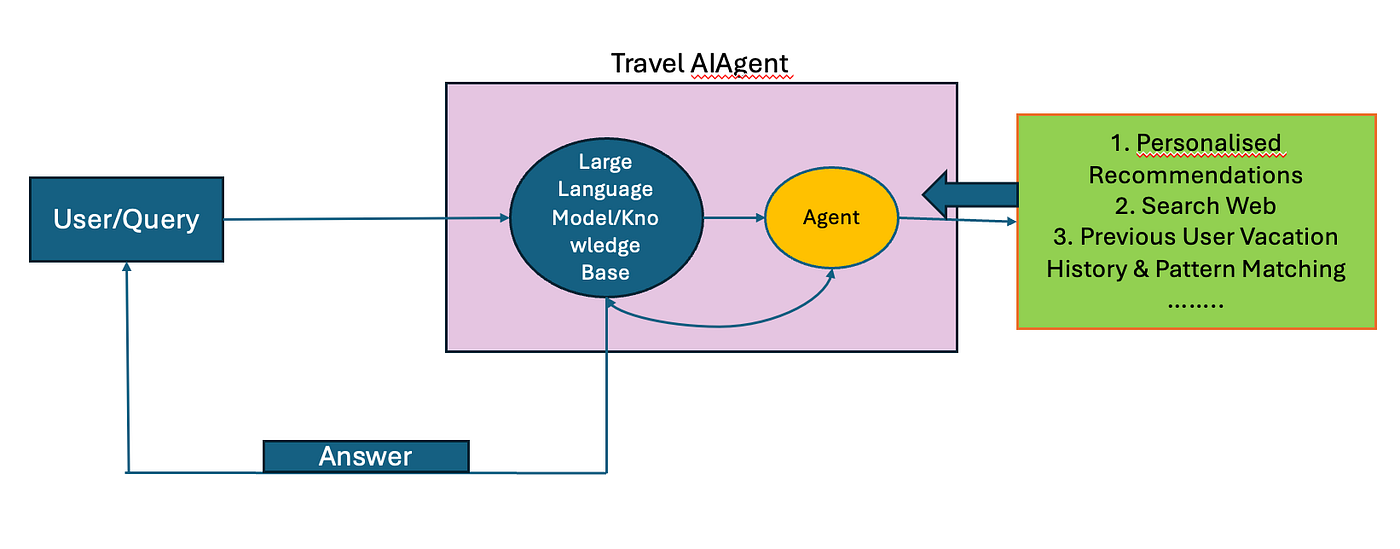
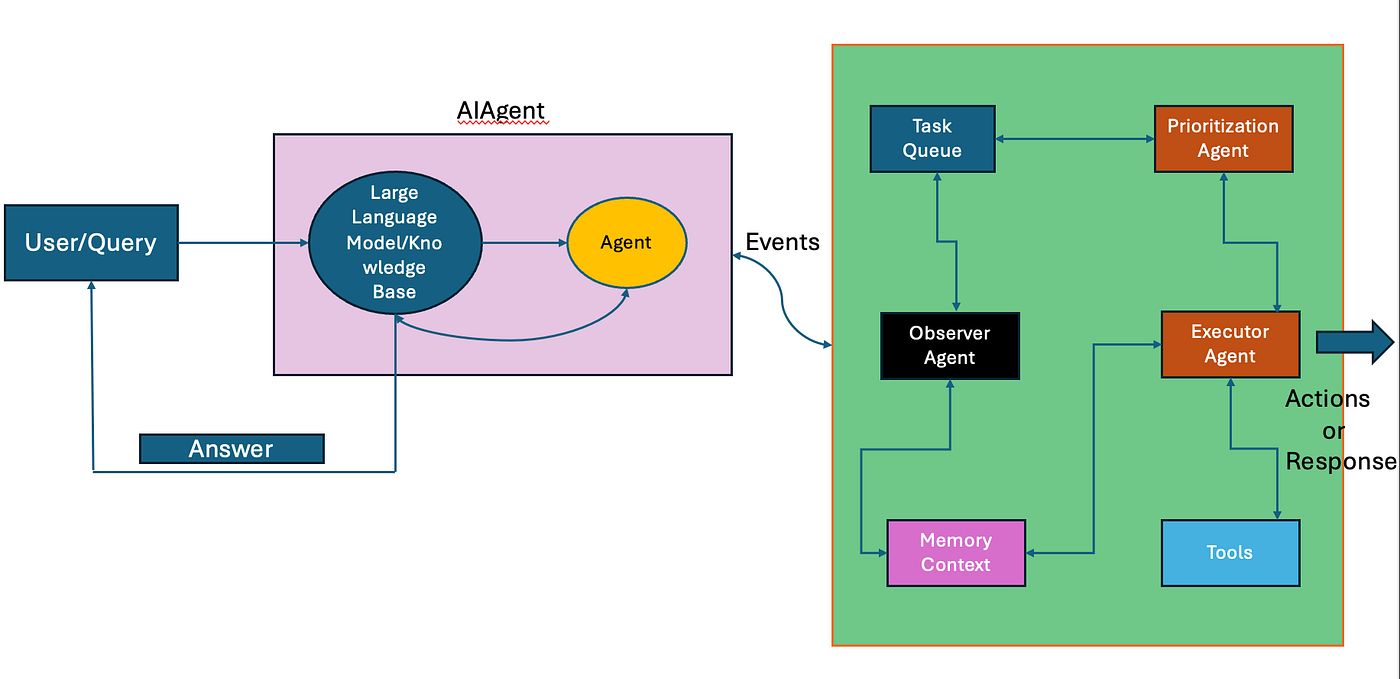
If you are still with me, Let’s see how AI Agents can be used in complex scenarios. Each Query can have a single event or multiple events, based on how we design AIAgents, agent gets to decide to trigger the event. Each event can again trigger plethora of events,
for example in this AI Agent triggers an event/events, observer agent kicks in to find what’s the ask? based on that it checks memory/cache context if this question is served otherwise this event pushed into task queue which connected to prioritization agent for scheduling or context aware decision making which then leads to executor agent to check/query internal tools to make an action. The beauty of AIAgents is these tasks can be customized based on the event triggered.
KEY CHARACTERISTICS OF AI AGENTS:
- Autonomy — Agents can act without human intervention
- Learning & Adaptation — Advanced Agents capable of learning from their experience and adapt the behaviors over time
- Interaction — Agents can interact with software systems, Databases, internal tools…
- Goal Driven — Agents are designed based on goal, Agents make decision, actions or response on achieving the goal it designed for.
AI AGENTS USE-CASES:
- Customer Service Chatbot/Personal Assistant
- Data Analysis, Document processing & Invoice Management
- Automated Network Provisioning — AI configures routers, switches, and firewalls dynamically based on business needs.
- Policy-Based Network Configuration — AI ensures compliance with security policies and automatically updates configurations.
- Intent-Based Networking (IBN) — AI translates high-level business intents into automated network policies.
STEP BY STEP WALKTHROUGH TO BUILD YOUR AGENT
Step1: Import the Libraries
import os
import re
from openai import OpenAI
Step2: Import OpenAI API Key & declare the model
# Replace this with your own OPENAI API Key
openai_key = "sk-proj-PLjvU_mtLFNjq1O6YWu0ayOt8Fin7mvcHRfuO91HtCnwWxHaNS16Q-2UY"
llm_name = "gpt-3.5-turbo"
client = OpenAI(api_key=openai_key)
Step3: Create your own Database for your Agent to interact
Step4: Create Food Agent Class
class FoodAgent:
    def __init__(self, system=""):
        self.system = system
        self.messages = []
        if self.system:
            self.messages.append({"role": "system", "content": system})

    def __call__(self, message):
        self.messages.append({"role": "user", "content": message})
        result = self.execute()
        self.messages.append({"role": "assistant", "content": result})
        return result

    def execute(self):
        response = client.chat.completions.create(
            model=llm_name,
            temperature=0.0,
            messages=self.messages,
        )
        return response.choices[0].message.content
Step5: Prepare the Prompt
Prompt Engineering is whole different topic, if you are not aware about how to do prompting then please check this course — it’s a good starting point. https://www.deeplearning.ai/short-courses/chatgpt-prompt-engineering-for-developers/
prompt = """
You run in a loop of Thought, Action, PAUSE, Observation.
At the end of the loop, you output an Answer.
Use Thought to describe your thoughts about the question you have been asked.
Use Action to run one of the actions available to you - then return PAUSE.
Observation will be the result of running those actions.

Your available actions are:

get_recipe:
e.g. get_recipe: pancakes
Fetches the recipe for a given dish.

calculate_ingredients:
e.g. calculate_ingredients: pancakes, 2
Adjusts ingredient quantities for the given serving size.

suggest_substitute:
e.g. suggest_substitute: butter
Suggests a substitute for a given ingredient.

Example session:

Question: How do I make pancakes?
Thought: I need to fetch the recipe for pancakes.
Action: get_recipe: pancakes
PAUSE

Observation: Ingredients: Flour - 200g, Milk - 300ml, Egg - 1, Sugar - 2 tbsp, Butter - 1 tbsp.
Steps: 1. Mix flour, sugar, milk, and egg. 2. Heat butter in a pan. 3. Pour batter and cook both sides. 4. Serve warm with syrup.

Answer: To make pancakes, use the following ingredients: Flour - 200g, Milk - 300ml, Egg - 1, Sugar - 2 tbsp, Butter - 1 tbsp. Follow these steps: 1. Mix flour, sugar, milk, and egg. 2. Heat butter in a pan. 3. Pour batter and cook both sides. 4. Serve warm with syrup.
""".strip()
Step6: Create Functions & Actions that your AIAgent has access
Here the function,
get_recipe → It will fetch recipe from your database
extract_number_and_unit → preprocess the units to calculate the servings
calculate_ingredients → Split the recipe by ingredients and show them
suggest_substitue → This will find alternate options for the ingredient mentioned
# Implement the functions for actions
def get_recipe(dish):
    dish = dish.lower()
    if dish in recipes:
        ingredients = ", ".join(
            f"{item} - {qty}" for item, qty in recipes[dish]["ingredients"].items()
        )
        steps = " ".join(f"{i+1}. {step}" for i, step in enumerate(recipes[dish]["steps"]))
        return f"Ingredients: {ingredients}. Steps: {steps}"
    return f"Sorry, I don't have a recipe for {dish}."

def extract_number_and_unit(qty):
    """
    Extracts the numeric part and unit from an ingredient quantity.
    Example: '200g' → (200, 'g')
    """
    match = re.match(r"(\d+\.?\d*)\s*([a-zA-Z]*)", qty)
    if match:
        number, unit = match.groups()
        return float(number), unit
    return None, None  # Return None if parsing fails

def calculate_ingredients(data):
    dish, servings = data.split(", ")
    servings = int(servings)

    if dish.lower() not in recipes:
        return "Recipe not found."

    adjusted_ingredients = {}
    for ingredient, qty in recipes[dish.lower()]["ingredients"].items():
        num, unit = extract_number_and_unit(qty)
        if num is not None:  # Ensure extraction is successful
            adjusted_ingredients[ingredient] = f"{round(num * servings, 2)} {unit}" if unit else str(int(num * servings))
        else:
            adjusted_ingredients[ingredient] = qty  # Keep original if extraction fails

    return f"Adjusted ingredients for {servings} servings: {adjusted_ingredients}"

def suggest_substitute(ingredient):
    ingredient = ingredient.lower()
    return substitutes.get(ingredient, "No substitute available.")

# Register available actions
known_actions = {
    "get_recipe": get_recipe,
    "calculate_ingredients": calculate_ingredients,
    "suggest_substitute": suggest_substitute,
}
Step7: Call the Food Agent every time there is an action to take
# Create regex to detect actions
action_re = re.compile(r"^Action: (\w+): (.*)$")

# Interactive query function
def query_foodAgent():
    bot = FoodAgent(prompt)
    max_turns = int(input("Enter the maximum number of turns: "))
    i = 0

    while i < max_turns:
        i += 1
        question = input("You: ")
        result = bot(question)
        print("Food Agent:", result)

        actions = [action_re.match(a) for a in result.split("\n") if action_re.match(a)]
        if actions:
            action, action_input = actions[0].groups()
            if action not in known_actions:
                print(f"Unknown action: {action}: {action_input}")
                continue
            print(f" -- running {action} {action_input}")
            observation = known_actions[action](action_input)
            print("Observation:", observation)
            next_prompt = f"Observation: {observation}"
            result = bot(next_prompt)
            print("Food Agent:", result)
        else:
            print("No actions to run.")
            break

if __name__ == "__main__":
    query_foodAgent()
Wrapping Up 🚀
AI agents are transforming the way we automate tasks, make decisions, and optimize workflows. From simple assistants to complex multi-step agents, the possibilities are endless. In this article, we explored the fundamentals of AI agents, their characteristics, real-world use cases, and a step-by-step guide to building one.
But this is just the beginning! In my next article, I’ll dive into LangGraph, a powerful framework for building structured, multi-step AI workflows. If you’re excited to explore how AI agents can handle more complex use cases with advanced reasoning and control, stay tuned!